Watch demo video
 1
Slow, manual takeoffs
Sketching roofs by hand and crunching numbers in spreadsheets eats up hours that should go into bidding more jobs.
 Built for roofing contractors and estimators
 Create roof layouts, calculate measurements, and generate professional reports for roofing projects — all in one streamlined workspace.
Roofing contractors and estimators lose hours on manual roof takeoffs and rough measurements. Roof Layout Studio replaces that workflow with a clean, repeatable process.
Sketching roofs by hand and crunching numbers in spreadsheets eats up hours that should go into bidding more jobs.
A wrong slope or missed facet throws off the entire estimate, leading to underbid jobs and uncomfortable conversations with the customer.
Handwritten notes and basic spreadsheets make it hard to win the bid when a homeowner is comparing you to a competitor with polished reports.
Without a clear roof layout diagram, ridges, valleys, and hips are tough to explain to crews, customers, and other trades on site.
Roof Layout Studio fits every role on a roofing job — from the estimator pricing the bid to the project manager running the install.
Import a roof plan, capture accurate measurements, and hand off a professional report to the homeowner, the office, and the install crew.
Tighten up roofing estimating with reliable roof takeoffs and area calculations — no more guesstimating from a satellite screenshot.
Keep the roof layout, measurements, and report in one place so jobs move from sold to scheduled without losing details in email threads.
Add roofing scope to a larger project estimate without keeping a dedicated roofing specialist in-house.
Everything roofing contractors need to go from a plan to a clean set of measurements and a professional report — without bouncing between tools.
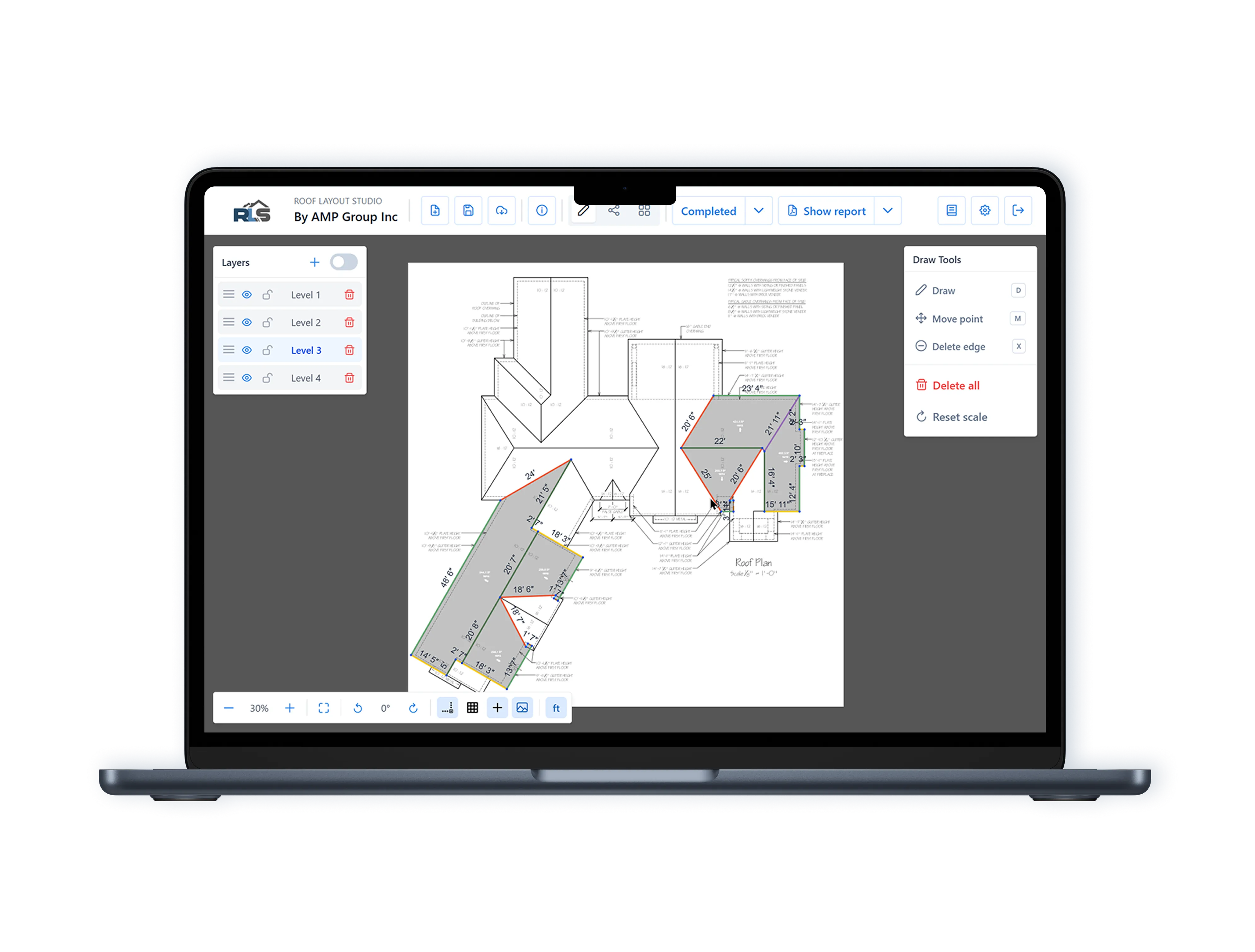
Drop in a PDF or image of the roof plan, crop to the area you need, and set true scale with a control line.
Trace the roof on top of the plan and tag each edge as ridge, valley, hip, eave, or gable, with clear color coding.
Assign a pitch to every facet and Roof Layout Studio applies the pitch coefficient automatically, so areas reflect the real surface.
Auto-generate roof facets from the edges and get a clean roof takeoff — every plane, edge length, and area itemized.
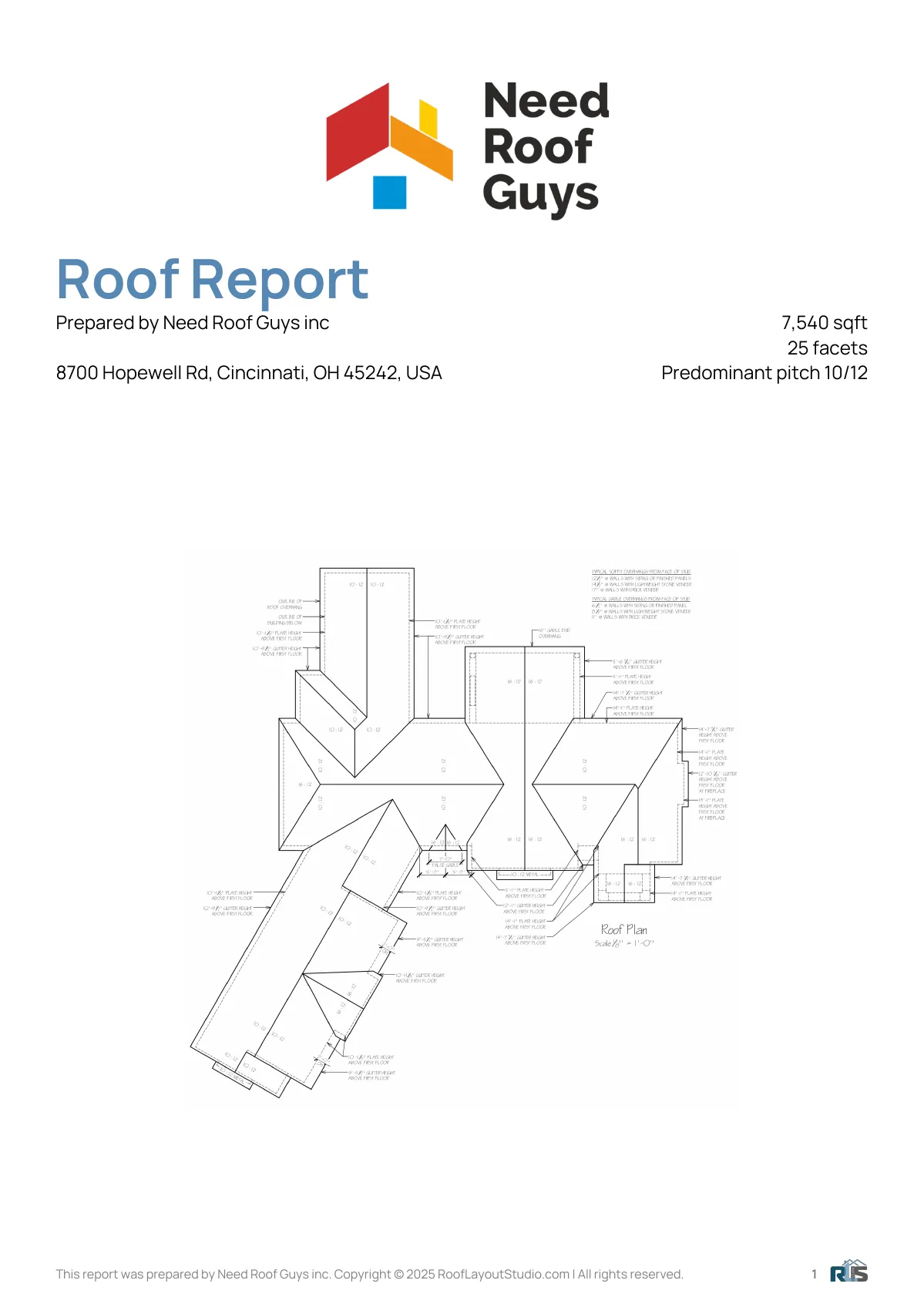
Generate polished PDF roof reports with measurements, diagrams, and totals. Download or email straight to the customer.
Autosave, multi-project management, status tracking, and team access keep your roofing pipeline organized.
A repeatable six-step workflow built around how roofing contractors actually estimate jobs.
Upload a PDF or image of the roof. Crop to the section you want to measure.
Draw a control line on a known dimension and enter its real length. Imperial and metric units are both supported.
Trace the roof outline and tag each edge — ridge, valley, hip, eave, or gable. Each type gets its own color.
Auto-create roof facets from the edges and assign a slope to each one.
See every length and area with the pitch coefficient applied, displayed right on the plan.
Preview the roof report, download the PDF, or email it to the customer in one click.
Upload a PDF or image of the roof. Crop to the section you want to measure.
Draw a control line on a known dimension and enter its real length. Imperial and metric units are both supported.
Trace the roof outline and tag each edge — ridge, valley, hip, eave, or gable. Each type gets its own color.
Auto-create roof facets from the edges and assign a slope to each one.
See every length and area with the pitch coefficient applied, displayed right on the plan.
Preview the roof report, download the PDF, or email it to the customer in one click.
Once the roof is laid out and measured, Roof Layout Studio rolls everything into a single PDF roof report — facets, areas, slopes, pitch coefficients, and edge totals — ready to attach to your quote.
 Open PDF
 "Roof Layout Studio makes roof measurements way faster. I import the plan, draw the edges, and have an accurate takeoff in minutes instead of hours."
"The pitch coefficient handling is a real game-changer for our estimating. Set the slope and the area math just works — no more side calculations on a notepad."
"Sending a clean roof report to the homeowner right after the inspection saves me time and helps us close more bids. And it's free."
The essentials about Roof Layout Studio: what it is, who it's for, and how it speeds up roof layouts, measurements, and reports.
Roof Layout Studio is roof layout software for roofing contractors and estimators. It turns a roof plan into a clean roof layout, accurate measurements, and a professional PDF roof report — all in one workspace, so you can move from inspection to quote without juggling tools.
Roof Layout Studio is built for roofing contractors, estimators, project managers, and general contractors handling roofing scope. If you regularly take roof measurements, run roof takeoffs, or send roof reports to customers, the workflow is designed around you.
Yes. Roof Layout Studio generates professional roof reports as branded PDFs that include the roof layout diagram, every facet, edge lengths, areas, and slope details. The reports are ready to attach to a quote or share with the homeowner, the production team, and the install crew.
Yes — accurate roof measurements are the core of the product. Set true scale, trace the roof, assign slopes, and Roof Layout Studio applies the pitch coefficient automatically so every area reflects the real surface, not the flat projection. That's the foundation of a reliable roof takeoff.
Roof Layout Studio gives roofing estimators the measurement data they need to bid with confidence: facet-by-facet areas, edge totals by type, and a clean PDF report you can drop into a quote. It does not price the job for you, but it removes the guesswork from the takeoff so your estimating math starts from solid numbers.
No. Roof Layout Studio is built for general roofing workflows — residential, commercial, and a wide range of roof types and pitches. It works for shingle, metal, tile, flat, and standing seam projects alike, because the layout, measurement, and reporting tools are roof-system agnostic.
Documentation, a quick-start path, and short video walkthroughs — everything you need to master Roof Layout Studio and ship roof reports the same day.
Read the Roof Layout Studio documentation: importing plans, drawing the roof layout, measurements, and exporting reports.
Create your Roof Layout Studio account and run your first roofing project — from plan import to a finished roof report.
Short walkthroughs covering roof layouts, measurements, takeoffs, and report prep in Roof Layout Studio.
Join roofing contractors using Roof Layout Studio to plan faster, measure accurately, and quote with confidence.